publishwell
Thumbnail Studio

Thumbnails you chose on purpose.

Start from your brief, your photos and the references you already like. Compare three concepts, refine the one worth pursuing, and export it ready to upload.

Publishwell opens soon. We'll email you once, when it does.
Already have an account? Log in
Follow an example project ↓
Example thumbnail project

A quieter desk

Video · 16:9 · Your ingredients, together
Explore the decisions behind the artwork
Brief · The starting point

Make room for the next good idea.

A practical desk reset for creators: clear the clutter, keep the useful tools and leave room to think.

  • A clear promise for the video
  • Creator photo chosen
  • Warm paper and natural light as inspiration
Only the brief is required. Other ingredients are optional.
Concepts · Three directions

Compare the idea behind each.

Empty desk, one lampThe calm is the promise, so the desk is nearly empty.Winner
Before and afterA split shows the change at a glance.
The three keepersThree objects on wood, so the viewer counts them.
Refine · Keep and Change

Build on the direction you chose.

Keep
The creator, warm desk and simple headline.
Change
Give the headline more room. Keep the warm look.

Refinement rounds stay with the original. Preview your choice at feed sizes, then download a JPEG or PNG.

Fictional project · Explore the workflow. Artwork examples appear below.

A workspace around your thumbnail

Keep the idea in view.

Your brief, photos, references and decisions belong together. Thumbnail Studio keeps them with the project so you can compare directions and build on the one that fits.

It plans three distinct concepts from what your video delivers, with an explanation of the idea behind each. You choose what to pursue.

The idea comes firstEvery concept starts from your brief and the reason someone would click.
Your ingredients, togetherChoose the photos, assets and inspiration that matter for this video.
Your decisions stay savedCompare originals, follow refinement rounds and pick a winner. Winners keeps every one ready to download.

What it looks like inside.

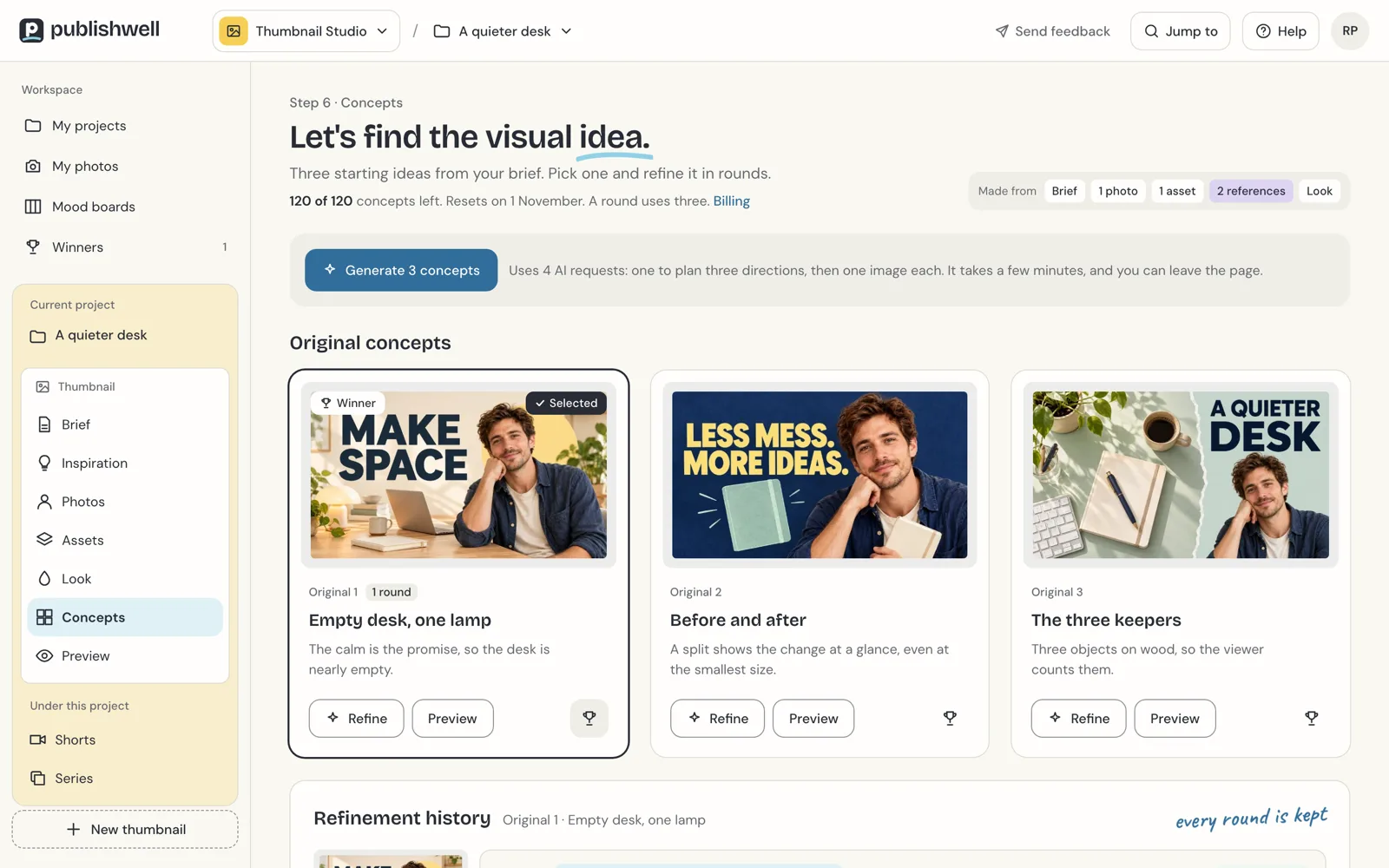
This is Thumbnail Studio itself, not a mockup. The account in it is a sample.

The Concepts step of a sample project: three concepts, one marked the winner, and a refinement round under it.
Sample data from a demo account. The creator, brands and numbers are made up.
One project, from the first idea

A quieter desk.

A video about making space for creative work. Here is how its ingredients become three directions worth comparing.

Fictional example · AI-generated artwork for this walkthrough, not screenshots of app results.

01 · Start with the brief

Make room for the next good idea.

A practical desk reset for creators: clear the clutter, keep the useful tools and leave room to think.

The promise
A calmer place to work, with simple changes you can try.
Fictional creator in an indigo overshirt holding a cream notebook
02 · Choose a photoAn ingredient that can appear in the artwork.
Reference artwork: Room to think, with cream paper, oak and a notebook
03 · Save inspirationWarm paper and natural light. A guide to the look.

04 · Compare three distinct ideas

Calm concept: Make space, with the creator and a warm desk
Empty desk, one lamp WinnerThe calm is the promise, so the desk is nearly empty.
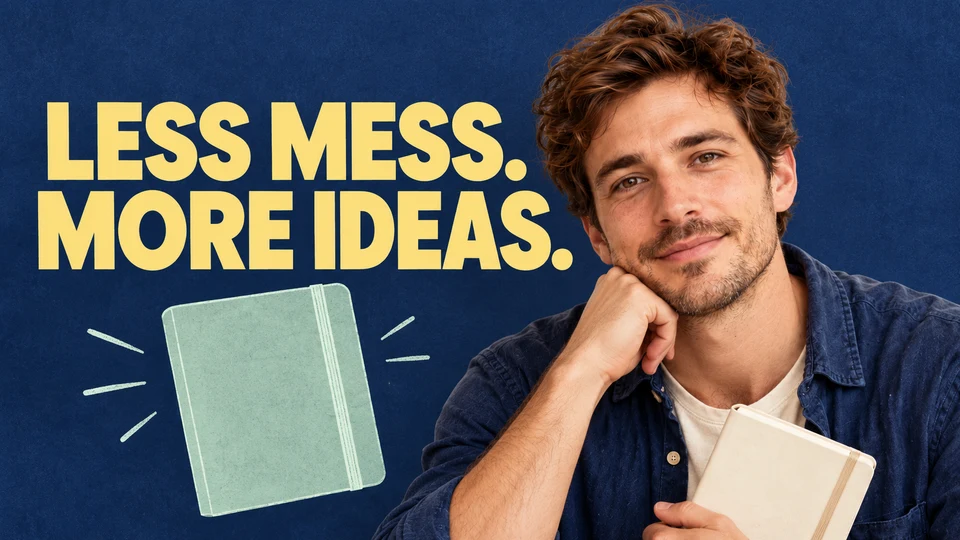
Bold concept: Less mess. More ideas., with yellow text on indigo
Before and afterA split shows the change at a glance.
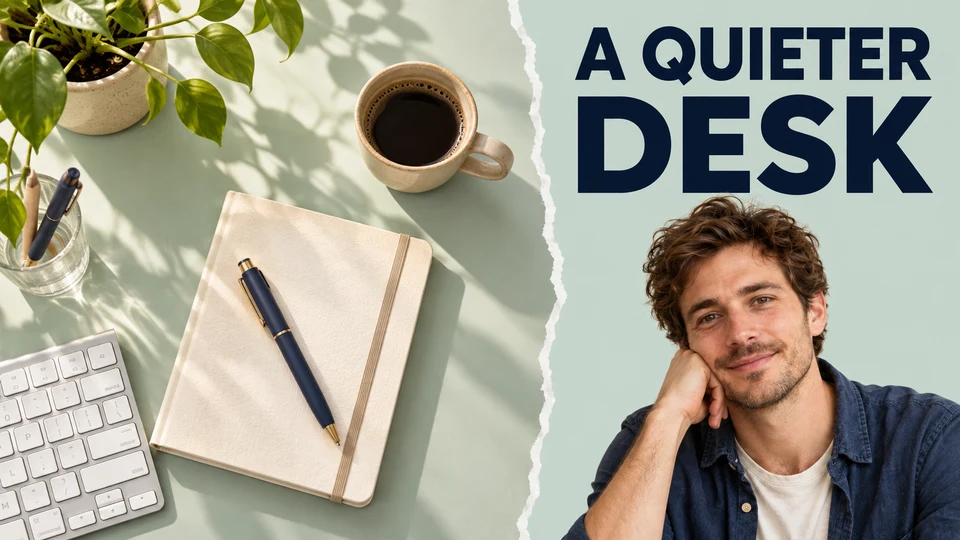
Editorial concept: A quieter desk, with an overhead desk collage
The three keepersThree objects on wood, so the viewer counts them.
05 · Refine the direction you chose

Keep the good parts. Make it yours.

Keep the creator, the warm desk and the simple headline. Then try a specific change. Each change makes a round of three. Here is one from each of two changes, next to the original.

Choose a refinement to compare with the original
Original · Empty desk, one lamp Original Make space artwork before refinement
The starting point stays saved.
Variation · More breathing room Refined Make space artwork with a smaller creator and more clear space around the headline
Change: Give the headline more room. Keep the warm look.
Variation · A closer connection Refined Make space artwork with a larger head-and-shoulders portrait of the same creator
Change: Bring the creator closer. Keep the headline readable.
06 · Preview, pick, download

Does it still read at feed size?

Check the concept small before choosing it. In the app, Preview offers three feed sizes on light or dark backgrounds, with JPEG and PNG downloads.

Small feed-sized preview of the Make space variation
A quieter deskExample feed preview
Generated artwork is one flattened image. To change what's inside it, refine it with a new round. Earlier rounds stay as they are.

A path you can make your own.

Move through the steps in order or skip around. Only the brief is needed to get concepts.

  1. 1 Brief Required
    Describe the video, or start from a YouTube link. Draft my creative brief can sharpen it.
  2. 2 Inspiration Optional
    Thumbnails, videos and mood boards you like. They guide the look. They aren't used as artwork.
  3. 3 Photos Optional
    Upload, paste, or use the camera studio.
  4. 4 Assets Optional
    Screenshots and logos that make it specific.
  5. 5 Look Optional
    A starting palette and background.
  6. 6 Concepts
    Three original directions to compare. Refine one by saying what to keep and change. Each round is kept.
  7. 7 Preview
    Check it at feed sizes, then download a JPEG or PNG.
Before you start

A few good questions.

What to bring, what you can change and what you can take away.

Do I need photos or a finished video?

Only a brief is required. Describe the video you plan to make, or start from a YouTube link for a video that already exists. Photos, supporting assets, inspiration and a chosen look are optional.

What is the difference between a photo and a reference?

Photos and supporting assets can appear in the artwork. Inspiration references guide the look. They are labeled separately and are not included as artwork.

Can I change a concept after it is generated?

Yes. Add Keep and Change notes to any finished concept to make a refinement round of three variations. Earlier rounds stay saved. The artwork is one flattened image, so changes inside it happen through refinement. Each round uses three concepts.

What can I download?

Download JPEG by default or choose PNG. Video thumbnails are offered at 1920 × 1080 and 1280 × 720. Preview lets you check the artwork at three feed sizes on a light or dark background before downloading.

Can I make Shorts and keep a consistent series look?

Yes. Set Video (16:9) or Short (9:16) on the brief. It's fixed once concepts are made. Shorts download at 1080 × 1920. Shorts from this video makes up to eight at once, and they follow the video's winner. A series can use a chosen winner and your notes to guide the look of new concepts.

Do I need my own AI key?

On a hosted Publishwell, no. We run the AI for you, and each round makes three concepts. On your own server, you add your own key.

Give your next video a clear direction.

Start with the idea. Keep your ingredients together. Choose the thumbnail that feels right for your video.

Publishwell opens soon. We'll email you once, when it does.
Already have an account? Log in