The part after the handshake.
Tie every sponsor deal to the video that delivers it. Track what you owe and what you're owed. When the video goes live, check it against the deal and send a report built from real numbers.
Studio Supply
One integration · A quieter deskFictional brand, terms and numbers · Select a view to explore the example.
The deal is signed. The work has started.
After the handshake come the deliverables, the dates, the disclosure, the report and the invoice. Most of it lives in email threads and a spreadsheet.
What it looks like inside.
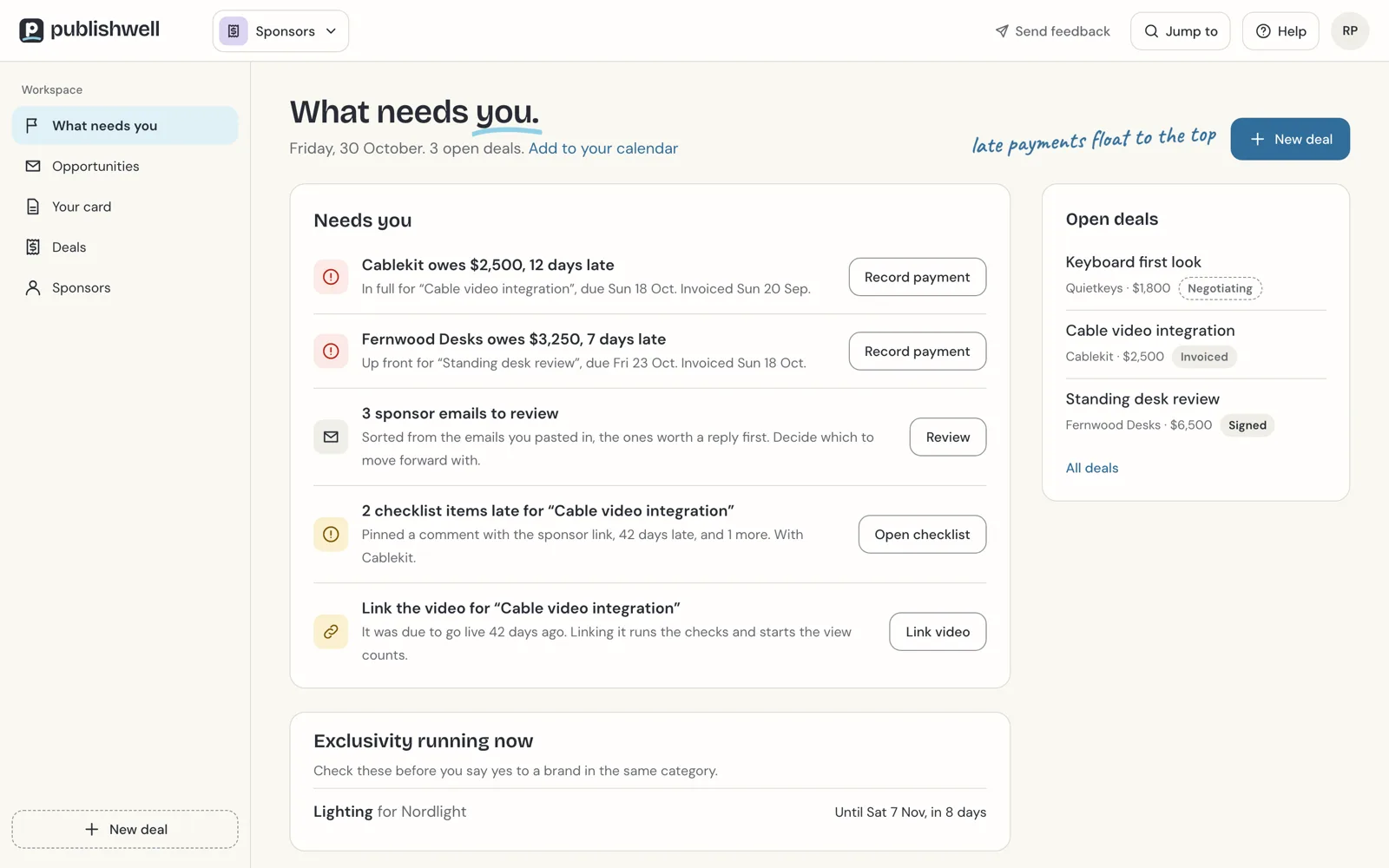
This is Sponsors itself, not a mockup. The account in it is a sample.
How it works
One place for each deal, from the day you say yes to the day you get paid.
-
1 Add the dealThe sponsor, the deliverables, the dates and the fee. Paid in halves? It tracks each part.
-
2 Track the deliverablesA checklist for the script, the cut and the publish date. Each item can have its own due date.
-
3 Set the exclusivity windowName the category and how many days after publish it lasts. A conflicting deal gets a warning.
-
4 Publish, then link itPaste the YouTube link. It checks the video against the deal, then again each day.
-
5 Views at 7 and 30 daysIt saves the view count on each of those days.
-
6 Send the reportA sponsor report built from those numbers.
-
7 Get paidInvoice sent, when it's due, and how many days late.
Checked against the deal.
Once the video is live, Sponsors reads the public YouTube video and checks what the deal asked for. You tick the paid promotion setting yourself.
- Sponsor link above the foldThe link sits above "show more" in the description, where people see it.
- Disclosure in the descriptionThe description says it's sponsored, in plain words.
- The video is publicNot private, not unlisted.
- Published on the agreed dateIt passes within a day of the date in the deal.
- Promo code in the descriptionIf the deal has a code, it looks for it.
Before, during and after.
The deal doesn't end when the video goes live. Sponsors keeps watching the parts that come later.
Exclusivity, remembered
Each deal can hold a category and a window. A new deal in the same category, inside that window, gets a warning.
Payment, in plain view
When the invoice went out, when it's due, and how late it is. The late ones don't hide.
Reports from real numbers
It saves the public view count at 7 and 30 days, and builds the report from those. No screenshots. Link clicks are the only number you type in.
A few good questions.
The details that help you decide where to begin.
Do I need to connect Gmail?
No. Add a deal directly or paste a sponsor email into Opportunities. It sorts it for you: a real pitch or not, what they want and any red flags. Move forward makes the sponsor and the deal. Connecting Gmail is optional, and for now only invited accounts can. It reads pitches so you can review them, and does not send replies.
What does it check on the video?
It reads the public YouTube video and its description for visibility, timing, the sponsor link, the promo code and disclosure words. It does not listen to the integration. You tick the paid promotion setting yourself.
Does it send invoices or collect payment?
You send invoices and record their dates and payments yourself. Sponsors tracks due dates and shows how many days a payment is late. It does not send invoices or collect money.
What can I share with a sponsor?
Your published sponsor card has your YouTube numbers, updated each day, your packages and a Work with me form. It suggests a price for each package from your typical views, with the math shown, and you can change any of them. It stays online while your plan is active. A deal has a printable report with saved view counts at 7 and 30 days. The report is private, so you share a saved copy yourself.
Can it find or negotiate sponsors for me?
It helps sort pitches you receive and track the deals you choose. You decide who to work with, negotiate the terms and send every reply. It does not search for sponsors.
Keep every commitment.
Give sponsors a card at your own link, with your channel figures, packages and a way to get in touch. Their message lands in Opportunities. Keep the terms, delivery checks, reports and payment dates together for every deal you choose.
- Find sponsors or negotiate for you
- Send invoices or take payment. It tracks them.
- Count clicks on the sponsor link. Type them in from your link tool.