Give every video a real launch.
Turn a finished video into a launch campaign. An announcement, then follow-ups that each give people a new reason to care, spaced out on every platform. You approve every post, and it goes out on time.

A quieter desk
A launch and two ways back inFictional campaign · Preview only. Nothing is scheduled or posted.
One post isn't a launch.
Most videos get one post on the day they go live. Then the next video takes over, and the people who missed that post never hear about it.
What it looks like inside.
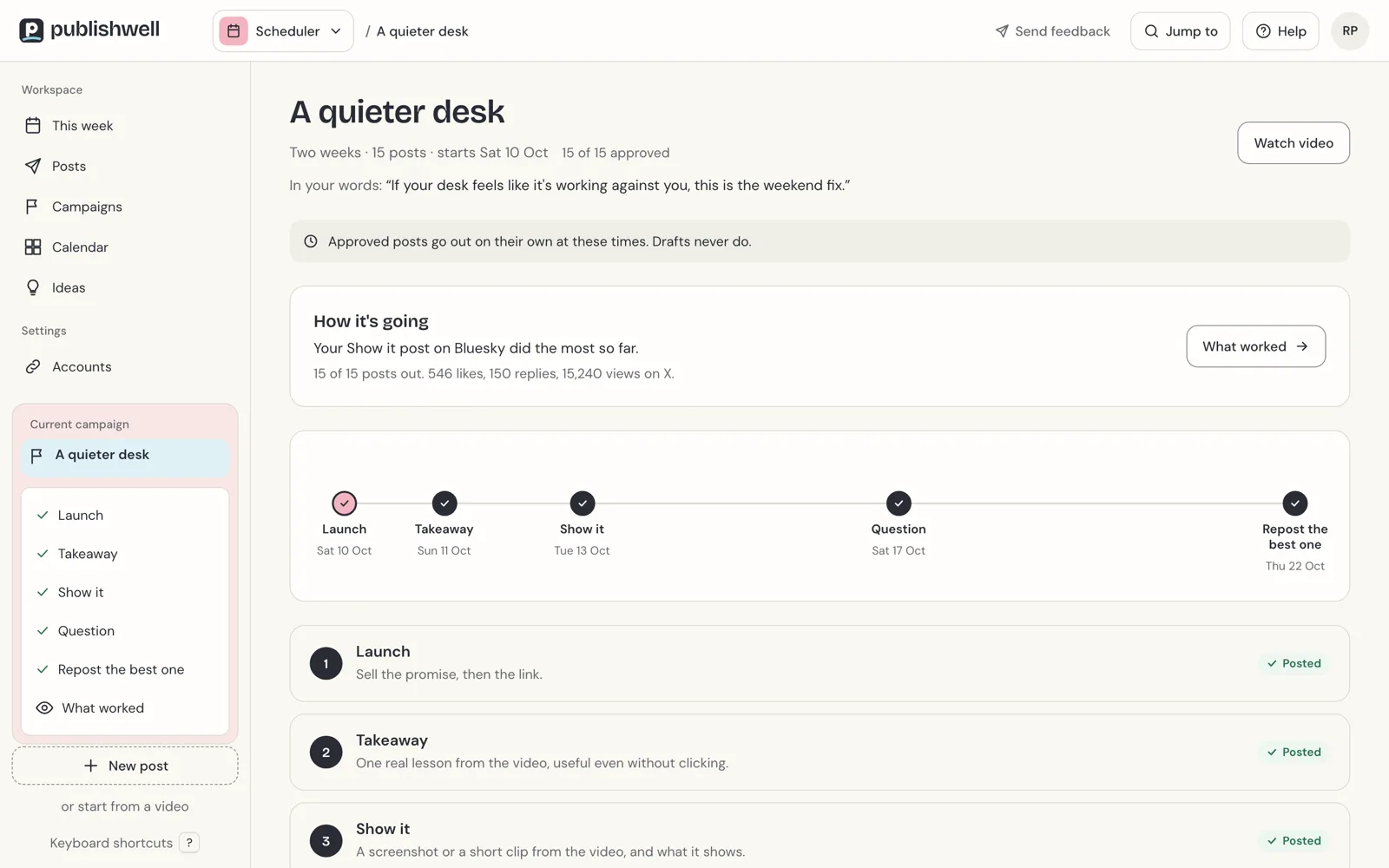
This is the Scheduler itself, not a mockup. The account in it is a sample.
How it works
From a finished video to a planned campaign in a few minutes. Then you read, rewrite and approve.
-
1 Paste the video linkThe title, description and thumbnail come in from YouTube. The video has to be public.
-
2 Say it in one sentenceIf you like: what the video is really about, in your words.
-
3 Pick platforms and a lengthTwo posts for a Short, a launch week, two weeks, or two weeks and then evergreen.
-
4 Read the draftsEach post is drafted for its platform from the video and your sentence.
-
5 Approve every postRewrite anything. Nothing goes out without your yes.
-
6 It posts on timeBluesky, LinkedIn and X post on their own once you connect them. YouTube community posts are marked "You paste it".
Each post, a new reason to care.
A campaign isn't the same post over and over. Each one has a job, so people who scrolled past the launch get another way in. This is the two-week campaign. Launch week keeps three: Launch, Takeaway and Question, over five days.
- 1 LaunchDay 0 to 1The promise, then the link.
- 2 TakeawayDay 1 to 2One real lesson, useful without clicking.
- 3 Show itDay 3 to 5A screenshot or a clip from the video, and what it shows.
- 4 QuestionDay 7 to 8Start a conversation about it.
- 5 Repost the best oneDay 12 to 13Your best post, reposted as it is, for the people who missed it. X and Bluesky.
- 6 Say it againAbout 90 days laterOptional. The same idea again, with a new first line, for people who missed it.
Timing you can read.
No black box. A few plain rules place every post, and you can see when and why.
- Each platform has its own time of day: X in the morning, LinkedIn mid-morning, Bluesky in the evening.
- Posts on one platform keep a minimum gap.
- A daily cap per platform, across every campaign, so two launches don't pile up.
- LinkedIn and X posts are planned on weekdays.
- One campaign never posts twice on a platform in a day.
- Likes, reposts and replies on Bluesky and X at 24 hours, 3 days and 7 days. The repost shares your best post.
A few good questions.
The details that help you decide where to begin.
What do I need to start a campaign?
A link to a public YouTube video. Choose the platforms and campaign length. The campaign starts when the video goes live, or right away if it's already out. A sentence about the video and a transcript are optional, and both help the drafts sound like you.
Can I post without a video?
Yes. New post writes one post for X, LinkedIn and Bluesky at once, each fitted to its platform. Send it now, at the next good time, or when you pick. A long post becomes a numbered thread on X and Bluesky, and any post can carry up to four images.
Which platforms can publish automatically?
Bluesky, LinkedIn and X publish approved posts after you connect the account. Nothing goes out until you approve it. X charges for every post, so a hosted account includes a set number of X posts a month, and one past the limit waits for the next month. YouTube community posts are marked You paste it: copy the text, publish it yourself and mark it posted.
How does it keep campaigns from clashing?
Spacing rules apply per platform across campaigns, with preferred times, minimum gaps and daily caps. One campaign never posts twice on a platform in a day. Each campaign keeps the time zone it was planned in. Times are displayed in your account time zone.
Can I see how posts performed?
Bluesky and X results are collected at 24 hours, 72 hours and 7 days. What worked compares each post with your usual. LinkedIn doesn't share numbers with apps yet. The calendar shows every post by day, week or month, and Posts lists everything, to search or see as a board.
Your words, on time.
The drafts save you the blank page. The voice stays yours. The Scheduler only posts what you approved, and never writes and posts on its own.
- Posting to Threads